Neck, headaches & shoulder · desk setup
The ergonomic fix for chronic neck pain and headaches
If posture training, massage, and new pillows haven’t helped, look below the neck. The ergonomic fix for chronic neck pain and headaches starts with giving your shoulder blades more support at your desk.
Licensed orthopedic physical therapist with 30 years of clinical experience, former owner of an
orthopedic PT clinic, and author of the Fixing You book series, including
Fixing You: Neck Pain & Headaches and the award-winning Pain Patterns
(2025 NIEA Award winner). He created an APTA-approved continuing education course teaching other
clinicians his systems-thinking approach to chronic pain.
Your neck muscles are basically being asked to hold up a bowling ball all day. No wonder they get tight and painful.
One of my patients had tried everything for her headaches, from physical therapy to posture gadgets. Nothing lasted.
It wasn’t until we raised her arm support and changed where her mouse sat that her headaches finally stopped. Once her workstation started meeting her body’s needs, symptoms she’d lived with for more than ten years calmed down.
— Rick’s case notes
In my article on the 30-second armpit test, I explained a key idea: many cases of chronic neck pain and headaches start at the shoulder blades, not the neck. This follow-up is the ergonomic fix for chronic neck pain and headaches: how to set up your desk and daily habits so your shoulder blades get the support they need, all day long.
Why does sitting at a desk cause neck pain and headaches?
Two key muscles that support your head, the upper trapezius and the levator scapulae, attach directly to your shoulder blades. When your arms aren’t supported well at your desk, your shoulder blades drop down and pull on those muscles for hours at a time.
I call this scapular depression: the shoulder blades rest too low on the back, and the small muscles holding your head up end up overworked. Most office chairs make it worse, because the armrests sit too low or too far out to actually hold your arms up.
Quick take: Unsupported arms let your shoulder blades sink, and the neck muscles attached to them pay the price. Better arm support at your desk takes that load off.
The armpit test: is your desk part of the problem?
Before you change anything at your desk, try this quick self-test to see whether depressed shoulder blades might be contributing to your pain. You’ll need a friend to help.
Try this test
The armpit test
- Gently turn your head side to side, then look up and down. Notice any pain or stiffness.
- Have a friend stand behind you, place their hands in your armpits, and lift your shoulders slightly.
- Staying relaxed, repeat the same head movements.
- Have your friend lower your shoulders, then check the movements again.
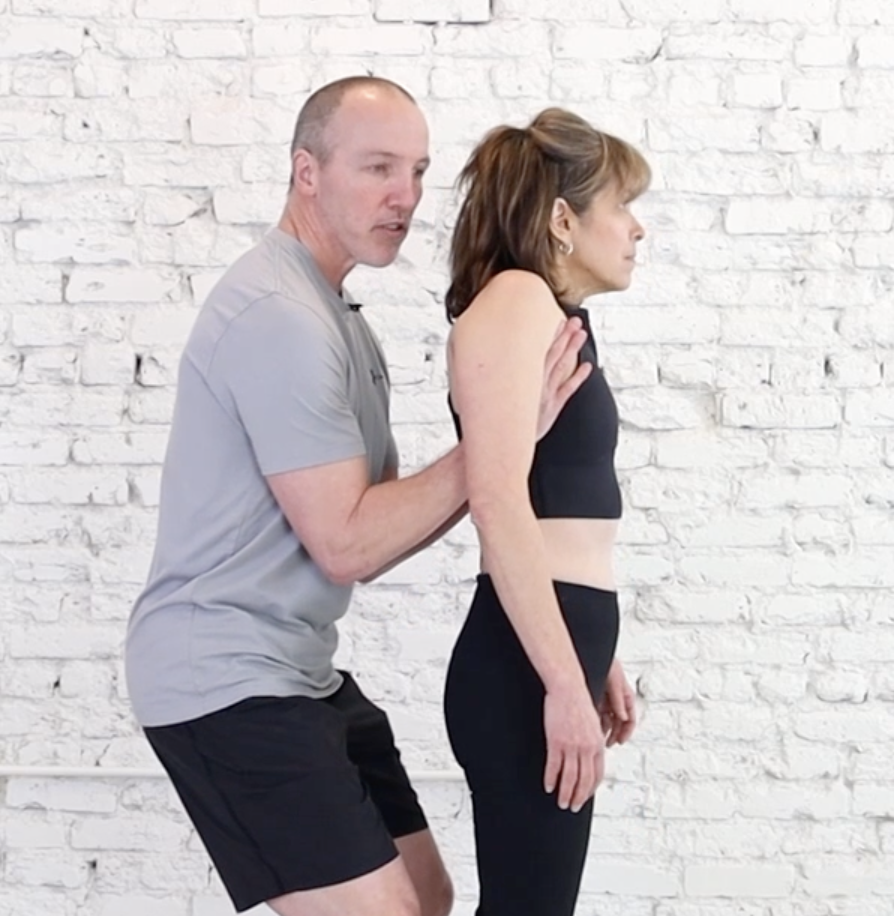
If your pain improves while your shoulder blades are lifted, your workstation should be doing the same thing for you. That’s the whole idea behind the ergonomic fix for chronic neck pain and headaches, and the rest of this article shows you how.
For the full version of the test, what a positive result means, and the exercises that go with it, see the 30-second armpit test.
The ergonomic fix for chronic neck pain and headaches
You don’t need a new chair. You need two firm pillows and a few minutes of setup.
Try this setup
The two-pillow arm support
- Fold two firm pillows in half.
- Place one between your ribs and the armrest on each side of your chair.
- Let your forearms rest gently on the pillows. Your elbows should sit slightly higher than you’re used to.

It should feel like your shoulder blades are being held up. That’s exactly the goal: the pillows do the job your friend’s hands did during the test, so your neck muscles don’t have to.
Setting up your keyboard and mouse
Even with great arm support, your keyboard and mouse need to work with your body, not against it.
- Keep your keyboard close. It should be near enough that your elbows stay at your sides.
- Center your mouse. Slide your keyboard over to make room for the mouse closer to the middle of your body.
- Don’t reach. Avoid lifting or pushing your shoulder forward to reach your mouse. That reach stresses your neck all day.
Four more desk habits that help
- Enlarge your font size. It stops you from leaning toward the screen without noticing.
- Use a footrest. Supporting your lower body helps your spine settle into better alignment.
- Add a pillow behind your back. Bring the chair to your spine instead of leaning back to find it.
- Shift often. Movement keeps your support muscles from getting fatigued.
If you have numbness, tingling, or weakness in your arm or hand, sudden or severe headaches, or pain after an injury, see your doctor before trying these changes.
Why neck pain keeps coming back
Many neck pain treatments fail because they focus on isolated muscles or short-term relief. Stretching helps, but if your shoulder blades stay depressed, you’re just chasing symptoms.
The real solution is a systems approach: looking at how your whole upper body holds tension through the day, and changing the root cause. For most desk workers, that starts with arm support. If your shoulders also hurt, why your shoulder pain keeps coming back explains how to check your shoulder blade position in more detail.
Putting it together
If the armpit test eases your neck pain or headaches, your desk is a good place to start. The ergonomic fix for chronic neck pain and headaches comes down to three things: lift your arms with two firm pillows, bring your keyboard and mouse close, and build in small habits that keep your shoulder blades supported through the workday.
Rick’s takeaway
Your workstation should work for your body, not the other way around. If lifting your shoulders helps, make your desk do that lifting for you, every hour you sit there.
Common questions
How do I know if my workstation setup is causing my neck pain?
Do the armpit test. If lifting your shoulder blades reduces your symptoms, sit at your workstation with the two-pillow setup and see if you feel the same support and relief.
Can poor posture at a computer cause migraines?
Yes. Poor posture, especially when it leaves your shoulder blades depressed, can create chronic tension in the neck and shoulder muscles. Over time, that tension can trigger tension headaches and even migraines.
What is the ideal sitting posture for preventing neck pain?
Sit with your back supported, your feet flat on the floor or on a footrest, and your elbows at about 90 degrees with your shoulders relaxed. If you have neck pain and headaches, your armrests likely need to be higher than they are. Set aside 15 minutes to test the ideas in this article and the armpit test article to find what works for you.
Are standing desks better for neck pain?
Standing desks add variety to your day, but they don’t support your arms in a way that solves neck pain and headaches. Switching between sitting and standing throughout the day can still be a good option.
Do ergonomic chairs really work?
They can help, but many don’t provide proper arm support or enough adjustment for your body. The pillow trick can make even a standard chair more supportive. If it works for you, you can then buy an ergonomic chair that allows the same setup.
Some links in this article are affiliate links. If you buy through them I may earn a small commission, at no extra cost to you. This helps support my website. I only recommend products I actually use with patients.
If lifting your shoulders eased your pain
The full testing and correction process, at home
7 Days to a Better Neck walks you through the armpit test, the exercises, and the daily habits that keep your shoulder blades supported. Use code RICKBLOG20 for 20% off.
Explore 7 Days to a Better Neck
Want the deeper systems-thinking explanation? Pain Patterns covers why neck pain so often starts somewhere else.
Have a question this article didn’t answer?
Send it through the Ask Rick form. I read every question and use the most common ones to shape future articles, videos, and my monthly email — sometimes by featuring them, never with identifying details, in a public answer. I ask for your email in case I need more detail, or want to let you know when I’ve covered it.